

Every Shopify store has a performance score someone is unhappy about, and most speed projects begin by trying to raise it. The score is a proxy. Conversion responds to something narrower than that.
"Nobody abandons a cart because your Lighthouse score is 62. They abandon because the button they were about to tap moved."
— Aashish Kasma, Co-Founder — Data & Analytics
Which metrics have a real link to conversion?
Three — the Core Web Vitals — and they behave differently from each other.
Largest Contentful Paint governs whether the page looks like it's working. It's the metric most connected to bounce on paid traffic, where the visitor has no loyalty and no reason to wait. Interaction to Next Paint governs whether the page feels responsive once it's visible — the delay between a tap and anything happening, which is where variant selectors and cart drawers fail. Cumulative Layout Shift governs mis-taps: content that moves after render sends a customer to the wrong page or the wrong variant.
The rest of a performance report — total blocking time, unused CSS, image format warnings — matters only insofar as it drives one of those three. Optimising them directly is how speed work turns into a quarter of effort with no commercial result.
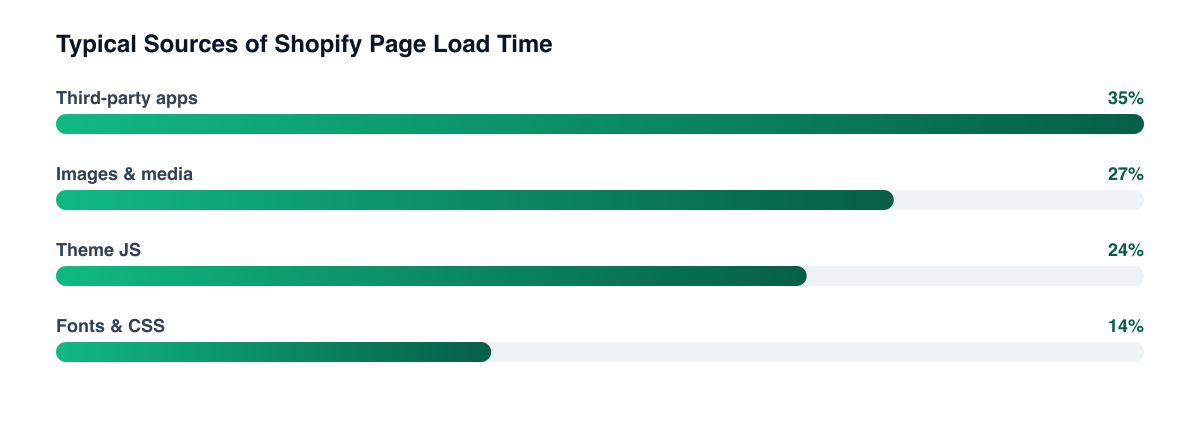
Why are apps almost always the answer?
Because each installed app typically injects script into every page, whether or not the page uses it. A review widget loads on the cart, a bundling app loads on the blog, an analytics tag loads three times because three tools each want their own. The theme you paid to optimise is rarely the bottleneck by the time a store is two years old.
The audit is unglamorous and effective:
- List every app and where its script actually runs. Most stores find at least one app injecting site-wide for a feature used on one template.
- Uninstall properly, not just deactivate. Removing an app from the admin frequently leaves its snippet in the theme. Orphaned code from apps nobody uses is common on older stores.
- Consolidate tags behind one container. Duplicate pixels are both a speed cost and a source of the data discrepancies that make reporting arguments unwinnable.
- Defer what isn't needed for first render. Chat widgets, review carousels below the fold, and loyalty badges do not need to block anything.
Does this matter more on some pages than others?
Yes, and it's the part usually missed. Speed work should be prioritised by the value of the page, not by which page scores worst. A collection page that receives most of your paid traffic is worth more attention than a homepage that receives mostly returning direct visitors who are already committed.
Product pages sit in the middle and carry a specific risk: they're the template most likely to accumulate app scripts, and the one where a layout shift costs a variant selection rather than a scroll position. If you fix one template properly, make it the one your ads land on — the same prioritisation logic that governs where paid traffic should land in the first place.
Measure on field data, not lab scores Lighthouse runs on a simulated device on your connection. Chrome's field data reflects the phones and networks your customers actually use, and the two frequently disagree about which metric is your problem.
How do you prove the work paid for itself?
Not with the score. Hold a before-and-after read on conversion rate for the specific template you changed, segmented by device, over a window long enough to clear weekly seasonality. Mobile is where speed effects concentrate, and blending it with desktop will hide most of the result you're looking for.
Be honest about attribution here. Speed improvements ship alongside other changes, seasonality moves conversion independently, and the effect is usually real but modest rather than dramatic. If you want a clean read, treat it like any other CRO test and avoid shipping three things in the same week.
Related guides
- Shopify CRO: The Complete Guide
- Shopify CRO Tests Worth Running First
- How to Build a High-Converting Product Page
- Checkout Optimization for Shopify: Recovering Revenue at the Last Step
Speed is a conversion input, not a scoreboard. Audit the apps, fix the template your traffic lands on, and measure the result on mobile conversion — that sequence delivers more than any amount of theme micro-optimisation in a Shopify CRO engagement.
PART OF OUR SERVICE
Shopify & CRO
PROOF FROM A CLIENT
+68% revenue per visitor
without increasing ad spend · Health & Wellness
How a Health Brand Lifted Revenue Per Visitor by 68%→Want a free marketing audit?
We'll review your tracking, ad accounts, and funnel — and show you exactly where the gaps are.
Get Your Free Audit →