

Someone in finance compares the GA4 revenue figure with the Shopify one, the numbers differ, and the conclusion is that "analytics is broken." Usually neither is wrong — they answer different questions, measured in different ways, and nobody wrote down which one is the source of truth.
"Shopify is the ledger and GA4 is a sample of behaviour. Reconciliation is deciding which number answers which question, and then explaining the gap between them."
— Aashish Kasma, Co-Founder — Data & Analytics
Which system should be the source of truth for revenue?
Shopify, for anything that has to match money: finance, tax, payouts, margin. It records the order whether or not the buyer's browser cooperated. GA4 is the source for behaviour: which channels, pages and journeys lead to orders. Treat GA4 revenue as an indicator for comparing channels, not as a number to be reconciled to the cent, and set an acceptable variance range rather than expecting zero.
Why do the totals differ even on the same orders?
Start with definitions, because they differ before any tracking issue enters. Shopify's Total sales is gross sales less discounts and sales reversals, plus taxes, duties, shipping and fees. In GA4's recommended ecommerce setup, a purchase event's value is the sum of price times quantity for the items, with tax and shipping sent as separate parameters. If your implementation sends the order total as value, GA4 includes tax and shipping and the two will agree on that point; if it follows the documented pattern, GA4 will read lower.
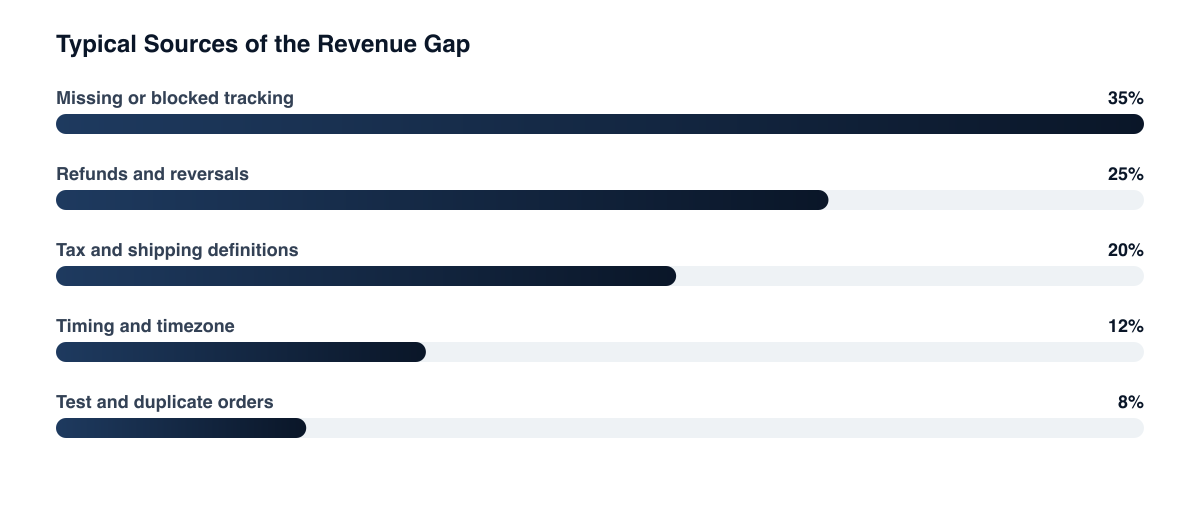
What causes the gap, and how do you test each cause?
Five causes explain most of the gap: refunds and reversals, tax and shipping, consent, ad blockers and browser limits, and timing. Test each by comparing like with like, sending refund events with the original transaction_id, checking consent coverage, and aligning timezones and date windows.
- Refunds and reversals. Shopify's Sales report nets out returns and other reversals as they happen. GA4 only knows about a refund if you send a
refundevent with the originaltransaction_id, per Google's ecommerce documentation. Without it, GA4 keeps the original revenue forever. - Tax and shipping. Covered above. Compare like with like: Shopify gross sales minus discounts against GA4 item revenue, then add the rest.
- Consent. When a visitor declines analytics storage, GA4 consent mode stops reading and writing analytics cookies. With the advanced implementation, cookieless pings feed modeling for the gaps; with the basic one, those visits are simply not measured. Your consent setup decides how much is missing.
- Ad blockers and browser limits. In principle, a browser or extension that blocks the GA4 script can't report the purchase, yet Shopify still has the order. We haven't found an authoritative figure for how large this is, and it will depend on your audience, so measure it rather than borrowing a percentage. Server-side tagging narrows it.
- Timing. Shopify's discrepancy guidance points to date ranges and when returns land relative to the original order. Make sure both tools use the same timezone and window.
Why does channel attribution differ as well?
Even when total revenue is close, the split by channel won't be, because the two systems are likely to attribute differently. GA4 applies its own attribution model and lookback windows to sessions it could measure, and ad platforms apply their own rules, so a sale GA4 credits to one source can be claimed by an ad platform as well (check each tool's attribution settings for specifics). This is the same dynamic covered in platform data discrepancies and the attribution modeling guide. Don't try to make them agree; use each for a different decision.
Reconcile on a fixed schedule, with a stated tolerance Compare Shopify net sales to GA4 purchase revenue weekly, using the same timezone and the same definition. Investigate only when the gap moves outside your normal band.
How do you set up a reconciliation that stays honest?
Pick one Shopify metric as the finance number and document its definition, send transaction_id on every purchase and refund, and send value, tax and shipping consistently. Then track the weekly gap as a metric, since a stable gap is fine and a sudden jump means something broke.
- Pick one Shopify metric as the finance number and document its definition.
- Send
transaction_idon every purchase and refund so GA4 can match them. - Send
value,taxandshippingconsistently and write down which you chose. - Check consent and tag coverage on checkout, since that is where purchases are lost.
- Track the weekly gap as a metric. A stable gap is fine; a sudden jump means a tag or consent change broke something.
Related guides
- Platform Data Discrepancies: Why Your Numbers Never Agree
- Server-Side Tagging: The Complete Guide
- The Shopify Analytics Stack
- Attribution Modeling Guide
The aim isn't identical numbers, it's a gap you understand and a single agreed definition of revenue. Setting that up across Shopify, GA4 and your ad platforms is part of our data and analytics work.
Want a free marketing audit?
We'll review your tracking, ad accounts, and funnel — and show you exactly where the gaps are.
Get Your Free Audit →