

Most teams write the subject line carefully and leave the preview text to whatever the first line of the email happens to say — "View in browser" or "Hi {{ first_name }}" — then wonder why a good offer reads like a form letter in the inbox. The two fields are rendered as a single unit, and treating one as an afterthought wastes half the space you get.
"A subject line earns the glance. Preview text earns the open. Most brands only write the first one."
— Nitesh Kasma, Co-Founder — Brand Strategy & Client Growth
How does an inbox actually show a subject line and preview text?
The subject line is the bolded headline of the row; the preview text (sometimes called the preheader) is the grey snippet that follows it. Where you don't set the preview text explicitly, email clients pull in the first text they can find in the body of the message, which is how navigation links and "view in browser" text end up in the most visible spot you have.
How much of each is shown depends on the client, the device, and the user's settings, so there is no safe character count that works everywhere. The practical rule is to put the point of the message first in both fields and treat anything after the first handful of words as a bonus rather than a requirement.
What should the subject line do?
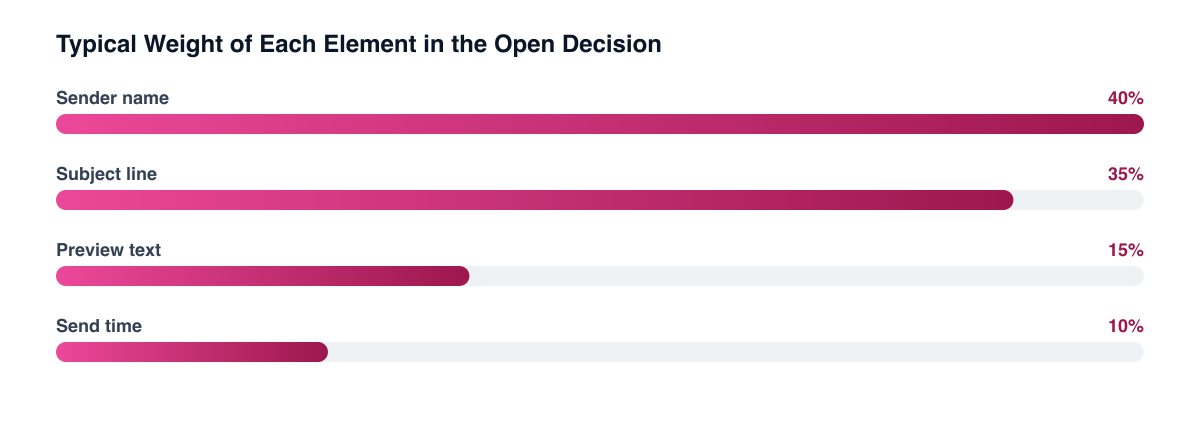
Its job is relevance and specificity: tell the reader what is in the email in a way that matches the reason they subscribed. "Your reorder is due" and "The restock you asked about" do this; "Big news inside!" doesn't. The sender name and the subject are the two fields almost every client shows, so the subject has to make sense with nothing else around it.
It should also be consistent with what the email delivers. A subject that over-promises can win the open and lose the next several sends, which matters for engagement signals and for deliverability over time.
What should preview text do?
It should add information, not repeat the subject. If the subject names the product, the preview can name the reason, the deadline, or the next step. A useful test: read the subject and preview together as one sentence. If the second half could be deleted without losing anything, it's wasted.
Two practical rules:
- Set it explicitly in every campaign and flow email — in Klaviyo and most ESPs it's a separate field from the subject.
- Keep the opening line of the body clean, so that when the field is left blank, the fallback isn't boilerplate.
Can you still A/B test subject lines on open rate?
Less reliably than you used to. Apple's Mail Privacy Protection hides the recipient's IP address and downloads remote content in the background when a message is received, rather than when it is viewed, which means a tracking pixel can load whether or not the person ever looked at the email. Klaviyo says this plainly in its guidance on identifying Apple Privacy opens: images are preemptively loaded "whether the recipient opens the email or not," which "artificially inflates your open rates" and makes it harder to identify subscribers who are truly engaged.
The consequence for testing is that an open-rate "winner" can be partly a measurement artefact, especially when a large share of your list uses Apple Mail. It is not that opens are meaningless, only that they no longer isolate human behaviour. Better options:
- Judge tests on clicks and on revenue per recipient, which an automatic pixel load can't fake.
- Filter Apple Privacy opens out of engagement segments, as Klaviyo describes, so a list isn't labelled "engaged" because of a proxy.
- Run subject tests where the metric downstream is the goal, such as a flow that drives a purchase.
Treat open rate as a directional signal, not a verdict Pick subject and preview winners on click and conversion metrics. Use opens only for non-Apple segments or for spotting a sudden break, such as a deliverability problem.
How do you put this into a repeatable workflow?
Write subject and preview together, as one sentence in two parts, and review them in a real inbox view rather than in the editor. Keep a short log of what was tested and what moved clicks, not opens, so the learnings carry across campaigns. Revisit it alongside your send frequency and segmentation, since a sharper line sent to the wrong segment still underperforms.
Related guides
- Email Deliverability for D2C: Getting to the Inbox and Staying There
- Email Send Frequency: How Often Is Too Often?
- Email Segmentation Beyond RFM
- Klaviyo Email Flow Strategy
If your subject-line wins keep failing to show up in revenue, the problem is usually in what you're measuring, not in the wording. We build the flows, the testing discipline, and the reporting behind them as part of our CRM and retention work.
Want a free marketing audit?
We'll review your tracking, ad accounts, and funnel — and show you exactly where the gaps are.
Get Your Free Audit →