

Most stores answer a checkout trust problem the same way: add a row of badges and call it done. It rarely helps, because trust at the payment step isn't about decoration. It's about whether the page looks like it belongs to a business that will take money and deliver.
"A trust badge is an answer to a question the customer hasn't asked yet. The checkout wins by answering the one they are actually asking: will this take my payment, and will I get my order?"
— Dhruvit Shah, Co-Founder — Performance Marketing & Growth Strategy
Where does trust actually break at checkout?
Baymard's published research on checkout abandonment reasons lists not trusting the site with credit card information among the top reasons shoppers leave, alongside unexpected extra costs, forced account creation, and too few payment methods. Trust is one cause among several, and the others are often friction you can fix without a single badge.
The pattern worth noticing is that trust failures cluster on newer and smaller brands, where the shopper has no prior relationship. That's most D2C stores acquiring cold traffic from paid channels. If that's you, the signal that matters is consistency between the ad, the product page, and the checkout, covered in more depth in the checkout optimization guide, which this post deliberately doesn't repeat.
Which trust signals are worth showing?
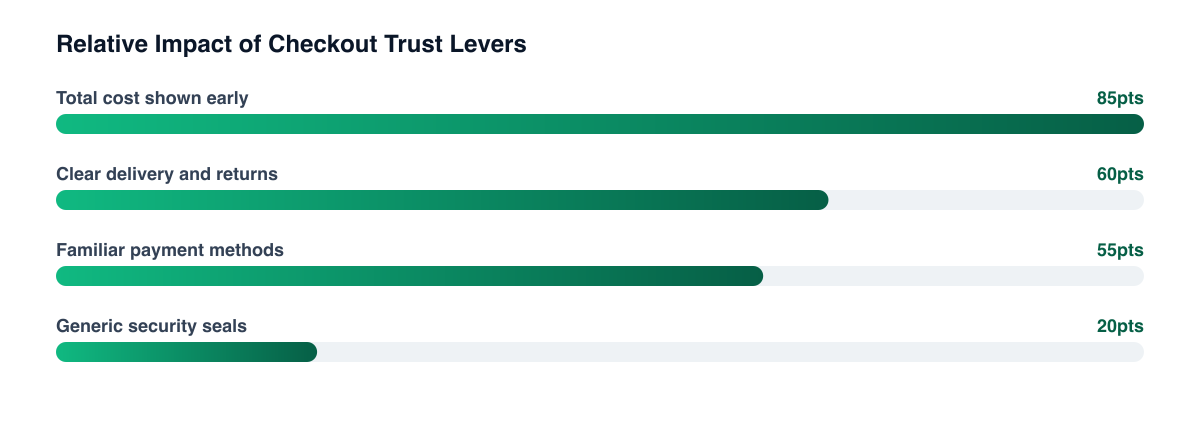
Signals that reduce a specific fear beat generic ones. A short list, roughly in order of what we'd test first:
- Total cost visible early. Shipping and tax surprises are among the most cited abandonment reasons in Baymard's list, so show them before the payment step.
- Delivery and returns terms in plain language next to the pay button, not buried in a footer.
- Recognised payment brands. Wallet buttons and card-network logos signal legitimacy simply by being familiar.
- A real contact route, a support email or WhatsApp number, visible on the page.
- Reviews that mention delivery or support, not just product quality, as in product page social proof.
Generic security seals are the weakest of these. Whether a third-party seal moves conversion depends on your audience, and we haven't seen a reliable universal result. Treat them as a test, not a given.
How should you order payment methods?
Order them by what your buyers use, not by what your gateway lists first. Baymard also lists too few payment methods as a reason for abandonment, so the goal is coverage plus a sensible default. On Shopify, a payment customization function can hide, rename, or move payment methods, and apps built on it do this without custom theme code.
A practical ordering approach:
- Lead with the method most of your paying customers already choose. Your own order data tells you; don't copy a competitor.
- Put express wallets where they're expected, usually above the form on mobile, where typing a card number is the highest-friction step.
- Keep cash on delivery and similar options visible if your market uses them, but think about the margin and return-to-origin cost, which differ sharply from prepaid.
- Rename vague methods. "Other payment options" tells the customer nothing.
Ordering is a test, not a rule. Measure completion rate and payment success rate by method, not just overall conversion.
What about payment failures and declines?
Baymard lists a declined card as its own abandonment reason, which means a trust problem and a technical problem can look identical in a funnel. If the card is declined and the page offers no clear next step, the shopper reads it as the store being unreliable. Show a specific message, keep the cart intact, and offer an alternative method on the same screen. Check your gateway's decline reasons before assuming a design fix, as the same logic applies to failed payments on subscriptions.
Test one trust change at a time against payment success rate Adding badges, reordering methods, and rewording the pay button together tells you nothing about which worked. Change one, hold the traffic mix steady, and read completion and payment success separately.
How do you test this without guessing?
Segment before you conclude. New versus returning visitors, mobile versus desktop, and paid-social versus search traffic all respond differently to trust cues, and an average hides the segment where the change helped. The CRO tests worth running are a good source of a first hypothesis, and your checkout analytics will tell you which step to aim at.
Related guides
- Checkout Optimization for Shopify: Recovering Revenue at the Last Step
- How to Reduce Cart Abandonment by 30% (Without Discounting)
- Reviews on the Product Page: Where Social Proof Converts and Where It Backfires
- Shopify CRO: 10 Tests Every Store Should Run Before Scaling Ad Spend
Trust at checkout is the sum of small, specific reassurances that remove one fear each, in an order that matches how your buyers actually pay. If you'd like a second pair of eyes on where your payment step is leaking, our Shopify and CRO team can audit it against your own order data.
Want a free marketing audit?
We'll review your tracking, ad accounts, and funnel — and show you exactly where the gaps are.
Get Your Free Audit →