

Product-page media gets changed constantly and tested rarely. A new hero image goes live, conversion moves a little, and everyone assumes the image did it, even though last week's traffic mix was different.
"With limited traffic, the discipline isn't running more tests. It's choosing the few changes big enough to show up, and being honest about what a noisy result can't tell you."
— Aashish Kasma, Co-Founder — Data & Analytics
What should you test first on a product page?
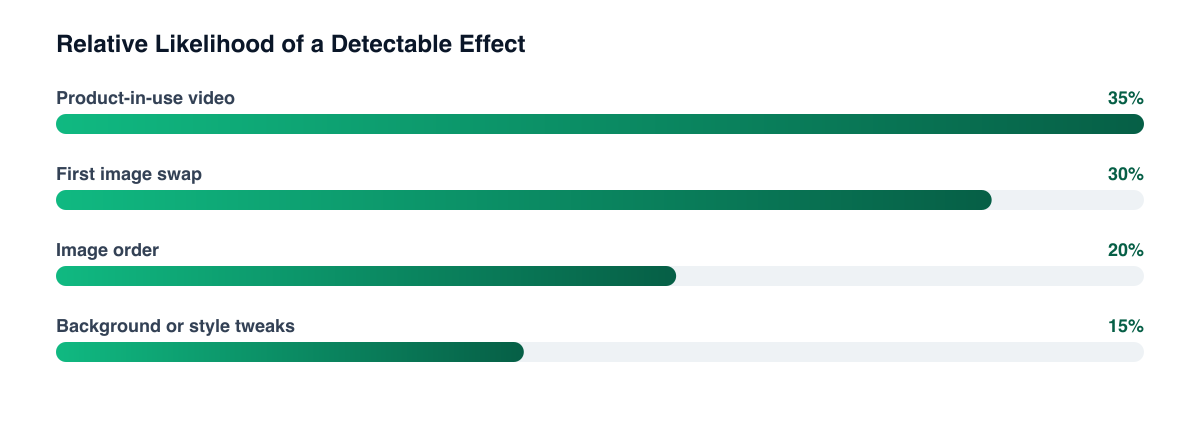
Start with the changes that alter what a shopper learns, not those that alter what the page looks like. A different background colour rarely matters; showing the product in use, at scale, or answering a doubt can. Shopify lets you attach images, video, and 3D models to a product, so you have room to test format as well as content.
In rough priority:
- First image: lifestyle versus clean packshot, since it's the biggest visual on mobile.
- Video presence: a short clip showing the product in use, versus none.
- Scale and context: a hand, a person, or a familiar object next to the product.
- Image order: which of the first three images answers the shopper's top question.
- Detail shots: texture, ingredients, or fit, matched to your most common pre-purchase question.
Your reviews and support tickets already tell you the questions. Our high-converting product page guide covers the wider layout.
Why is video harder to read than images?
Video adds two variables at once: the content, and its effect on page weight. A video that autoplays heavy files can slow the page, and a slower page lowers conversion on its own, so a "video lost" result may really be "slow page lost." Check site speed alongside the test, and treat load impact as part of the result rather than a separate concern.
Video also changes behaviour in ways that don't show up in conversion directly: more time on page, more engagement, fewer returns. Pick the metric before the test, and note secondary ones separately.
How do you read results with limited traffic?
You usually can't reach a clean statistical answer in a week. So change the question from "did it win?" to "is the evidence strong enough to act on, and what is the cost of being wrong?"
- Run full weeks so weekday and weekend behaviour both appear.
- Decide the duration and metric up front; stopping the moment a variant looks ahead is how false wins happen.
- Prefer bigger changes. A subtle tweak needs far more traffic to detect than a large one.
- Use a higher-volume proxy such as add-to-cart rate, but keep purchases as the final check.
- Don't over-split. Segmenting a small sample by device, source, and country leaves tiny buckets that mislead.
If the result is inconclusive, that's still an answer: the change probably isn't a large lever for this product. See CRO tests worth running for a way to rank what to try next.
Test one large change per product, and keep the loser's data A single bold test on a high-traffic product teaches more than five subtle ones on low-traffic pages. Log the hypothesis, the dates, the traffic mix, and the result so the next test builds on it.
What can you do when even one product is too thin?
Pool learnings across similar products. If product-in-use video helps on one skincare SKU, test the same pattern on a related one before rolling it out. Treat each as supporting evidence, not proof. You can also borrow qualitative signal: session recordings, heatmaps, and post-purchase surveys asking what nearly stopped the customer. These don't replace a test, but they help you choose better ones, and reviews and social proof can fill gaps your own imagery can't.
Be careful about external changes, such as a promotion, a traffic spike from a new ad, or a theme update mid-test. Any of them can contaminate a small sample.
Related guides
- Building a High-Converting Product Page
- Shopify CRO Tests Worth Running
- Product Page Reviews and Social Proof
- Shopify Site Speed and Conversion
Small stores can test well; they just have to test boldly and read cautiously. If you'd like help picking the right first experiment and setting it up properly, our Shopify CRO team does this regularly.
Want a free marketing audit?
We'll review your tracking, ad accounts, and funnel — and show you exactly where the gaps are.
Get Your Free Audit →