
Broad match and automated bidding have made Google Ads easier to run and easier to overspend on at the same time — the algorithm will happily match your ad to a query you'd never have chosen, as long as it thinks it can get a conversion.
"Broad match and automated bidding have made Google Ads easier to run and easier to overspend on at the same time — the algorithm will happily match your ad to a query you'd never have chosen, as long as it thinks it can get a conversion."
— Dhruvit Shah, Co-Founder — Performance Marketing & Growth Strategy
The search terms report is the one place that shows you the gap between the keyword you bid on and the query that actually triggered your ad. Most accounts haven't had that report pulled in months.
Why does this waste hide so well in a healthy-looking account?
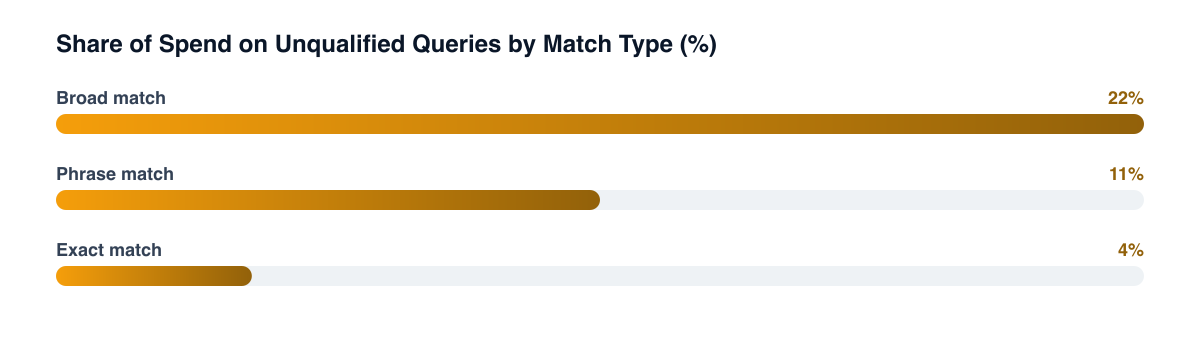
A campaign can hit its target ROAS while still burning a meaningful slice of its budget — in the accounts we've audited, often well into double digits — on queries that happen to convert once in a while but never should have matched in the first place. Automated bidding optimizes toward the conversion signal it's given, not toward relevance — so as long as the blended number looks fine, nobody goes looking at the query level. The waste is real, it's just diluted across thousands of impressions instead of showing up as one obvious line item.
What should you actually pull and look at?
Export the search term report at campaign level, sort by spend rather than conversions, and flag queries without commercial intent. Also check for your own brand terms appearing under non-brand campaigns, where non-brand budget buys clicks that would have converted for free.
- Export the search term report at the campaign level, not the account level — irrelevant-query patterns differ by product line, and an account-wide view averages away the worst offenders.
- Sort by spend, not by conversions. The queries costing the most money without converting are the ones worth acting on first; a query that's converted twice at high cost isn't automatically safe either.
- Flag queries that don't match commercial intent — informational searches, competitor product names you don't carry, job-seeker or support-related terms that occasionally slip through broad match.
- Check for your own brand terms appearing under non-brand campaigns — a common leak where non-brand budget is quietly buying clicks that would have converted for free under branded search.
The five-minute gut check Filter the search term report to queries with at least $50 in spend and zero conversions over the last 30 days. If that list is longer than a page, there's an easy first pass of negative keywords waiting to be added.
How often does this actually need to happen?
Audit weekly for accounts spending aggressively on broad match and bi-weekly for phrase and exact-heavy accounts. A one-time cleanup only helps for a few weeks, and a running negative keyword list per campaign turns each audit into a five-minute review.
A one-time cleanup helps for a few weeks, then the same pattern creeps back as the algorithm keeps testing new match variations:
- Weekly for accounts spending aggressively on broad match — the query mix shifts fastest here, and negatives added once a month are already stale.
- Bi-weekly for phrase and exact-heavy accounts, where drift is slower but still worth catching before it compounds.
- Build a running negative keyword list per campaign rather than adding negatives ad hoc — it turns the audit into a five-minute review instead of a rebuild each time (how to add negatives from the report).
Does tightening negatives ever hurt performance?
It can, briefly — pulling out a chunk of broad match traffic sometimes drops volume before the algorithm re-adjusts to a cleaner signal. The distinction that matters is whether the removed queries were converting efficiently or just converting occasionally at a cost that didn't justify it. A short-term dip in impression volume is a reasonable trade for a bidding algorithm that's now learning from cleaner data — the account's blended ROAS usually improves within one to two weeks once the noise is gone.
Related guides
- Brand Search Defense: Protecting Your Branded Keywords From Competitor Bidding
- Google Search Ads for D2C: Campaign Structure That Scales
- Performance Max Campaigns: What Actually Controls Where Your Budget Goes
- ROAS and Attribution: The Truth About Blended vs. True Return
None of this requires new tooling or a bigger budget — it requires someone actually opening the search term report on a schedule. That's the whole audit, and it's usually the fastest ROAS improvement available in a paid search account that hasn't been touched in a while. It's the cheapest recurring performance marketing habit a brand can build, and the one most accounts quietly stop doing after the first month.
PART OF OUR SERVICE
Performance Marketing
PROOF FROM A CLIENT
5x revenue growth
monthly revenue, driven by performance marketing, creative briefing and CRM · Men's Grooming
How Hivado Grew Revenue 5x in 6 Months with Performance Marketing→Want a free marketing audit?
We'll review your tracking, ad accounts, and funnel — and show you exactly where the gaps are.
Get Your Free Audit →